Summary:
An HRIS - human resources information system is a software system used to store employee information and manage multiple human resources (HR) functions in one place.
What is an HRIS?
An HRIS – Human Resources Information System is an all-in-one software solution designed to centralize employee data and automate critical HR functions. From payroll processing and time tracking to benefits management, an HRIS simplifies administrative tasks, allowing businesses to focus on strategic workforce initiatives.
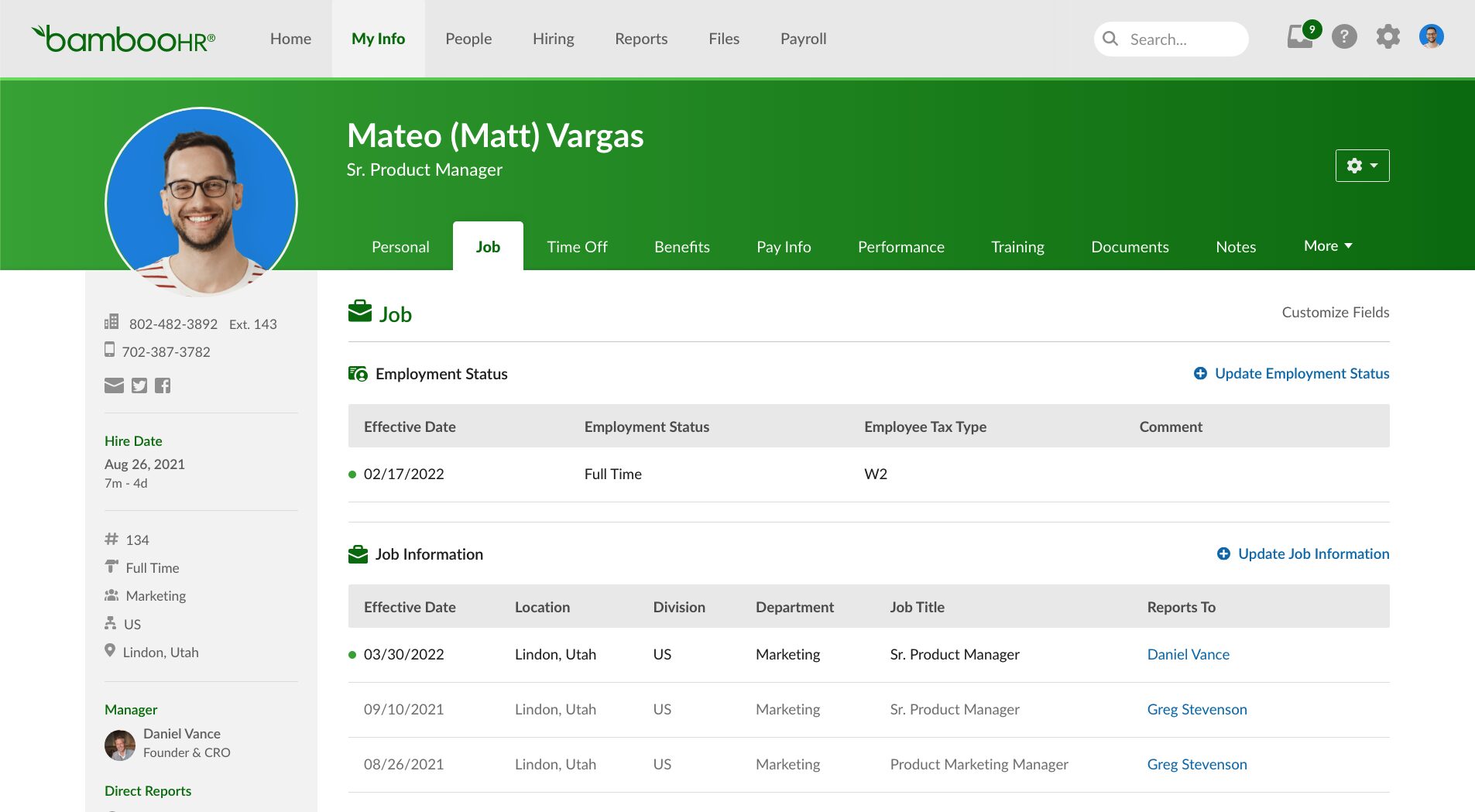
“Example of an HRIS: BambooHR streamlines employee data management and automates essential HR tasks
Often referred to as a Human Resources Management System (HRMS) or a Human Capital Management (HCM) suite, these systems combine various HR processes into a single, streamlined platform to enhance efficiency and accuracy.
What Does an HRIS Do?
An HRIS is an overarching HR platform designed to make most HR functions easier and more efficient. Each HRIS is different, but they are frequently used for these functions within an organization:
Employee data management: An HRIS should be the central storage place for employee information, including name, role, location, contact information, contract, and other critical personal data.
Benefits administration: An HRIS can track insurance, retirement plans, time off, wellness, maternity, childcare, and all other benefits. The system can also automate most of the administration of benefits.
Leave management: A leave management module easily manages employees’ leave entitlements and schedules. Scheduling conflicts can be prevented, and leave requests can be granted or denied through the HRIS.
Payroll processing: Rather than manually calculating every employee’s salary individually on a monthly basis, an HRIS can automate this calculation easily. It can incorporate tax withholdings and deductions, as well as bonuses and incentives that need to be added to gross pay first.
Attendance and time management: An HRIS’s attendance and time module can completely replace manual timesheets. Data on an employee’s punctuality and hours worked can be collected to inform payroll and performance evaluations.
Reporting and analytics: With all HR data centralized in one software solution, analysis is more rapid and accurate. Many HRIS can produce figures, charts, and even full reports automatically.
Onboarding management: The multiple steps required to onboard new hires, including paperwork completion and training steps, can be scheduled and tracked within an HRIS.
Recruitment: The HRIS can be used to manage talent, monitor new and vacated positions, and create and disseminate job postings. Application management can also be largely automated, freeing HR departments to focus on interviewing and contracting applicants.
Employee evaluation: Most organizations evaluate their employees’ performance periodically. This function needs to be scheduled, and the data collected can be centralized in an HRIS. This data can later be used to drive professional development and inform salaries.
Employee self-service: Most HR information systems allow employees some limited, non-administrative access to their own files. This enables them to check on information like benefits and leave and submit requests or data directly without having to pass through an HR representative.
Key Features to Look for When Selecting an HRIS Platform
Not all HR information systems are created equal. Some are aimed at experienced experts, while others are simpler to use but also more limited in their functionality. HR departments looking to implement HRISs should consider these key features when selecting their software solutions:
Functionality: Does the HRIS do everything you need it to do, automating as many HR processes as possible?
Security: Does the HRIS provide adequate security to keep sensitive employee data secure? Do its security features conform to your organization’s compliance requirements?
User interface: Is the system easy to interact with and to learn for new users?
Analytics and reporting capabilities: Can the HRIS adequately analyze your information so you can make data-led decisions? Does it create automated graphs, figures, and reports?
Customer service/support: Does the HRIS company provide support to new users?
Scalability: Can the HRIS scale easily to keep up with the growth of your business?
Mobility: Can the system be easily accessed on mobile devices using a safe and secure app?
Challenges of Implementing and Maintaining an HRIS
Small enterprises with small numbers of staff may not find it challenging to handle all the data required for effective HR management. As enterprises grow, however, so do their workforces, and this makes data multiply. To help keep everything clear, enterprises may choose to implement an HRIS, but while they can make HR a lot easier, there are also challenges to using them, including:
All staff data must be entered into the HRIS, and this initial data entry is extremely time-consuming.
Complex new software systems can have steep learning curves.
Investment is required to buy and implement a system and for ongoing IT support.
Incorporating information from various sources into a centralized system can produce complications and errors.
Andrew (Drew) joined the Remote People team in 2020 and is currently Director, Regulatory Affairs. For the past 13 years, he has been a trusted advisor to C-Suite executives and government ministers on international compliance and regulatory issues. Drew holds a law degree from the University of Otago, a PhD from the University of Sydney, and is an enrolled Barrister and Solicitor of the High Court of New Zealand.
Book a free 30-minute demo with a global hiring expert
Tell us what you need. You'll get a tailored, transparent proposal within 24 hours, plus a free call to walk through it.
Step 2 of 4
Unlock volume pricing
Tell us about your company
So we can match you with a specialist who knows your market — and unlock volume pricing tiers.
* All fields are required.
Step 3 of 4
Get per-country cost breakdowns
Where and when are you hiring?
Tell us the geography and timing and we'll quote each country line by line, with onboarding timelines.
* All fields are required.
Step 4 of 4
Beat your current setup, line by line
Help us beat your current setup
We'll benchmark your current deal and send a line-by-line proposal in 24 hours — showing exactly where we cut cost, time, or risk. After you submit, you can book a call to walk through it together.
* All fields are required.
Thanks! Your proposal is on its way.
Expect a tailored, line-by-line proposal in your inbox within 24 hours. In the meantime…
Want to walk through it together?
Book a free 30-minute call with one of our specialists. We'll explain every line, answer your questions, and tailor the proposal further if you need.

 Employ
 Recruit