
 Recruit
A Complete Guide on How to Generate a Real Pay Stub Online

Published on


Let RemotePeople handle payroll, compliance, and HR admin worldwide so you can focus on building your team.
Key Takeaways
- Pay stubs are important documents recording the details of employee payment, including all deductions.
- It is legally required to issue a pay stub to employees, though some fields are optional.
- To save money when constructing pay stubs for your employees, consider using a free online pay stub generator.
What Is a Pay Stub and Why Is It Important?
A pay stub is a crucial financial document that provides employees with a detailed breakdown of their earnings, deductions, and net pay. Whether you’re an employer, freelancer, or independent contractor, knowing how to generate a legitimate pay stub is essential for record-keeping and compliance.
Why are pay stubs important?
- Used as proof of income for loans, rentals, and credit applications.
- Helps employees track earnings, deductions, and benefits.
- Required for tax filing and financial planning.
- Ensures compliance with federal, state, and local labor laws.
Why Use an Online Pay Stub Generator?
Creating pay stubs manually can be time-consuming and prone to errors. Using an online pay stub generator helps you:
- Save time – Automates calculations for earnings, taxes, and deductions.
- Ensure accuracy – Reduces mistakes in payroll processing.
- Customize pay stubs – Add your company’s branding, logo, and details.
- Stay compliant – Meets legal payroll documentation requirements.
👉 Need a free pay stub generator? Try our online tool to create compliant pay stubs in minutes!
Step-by-Step Guide to Generating a Pay Stub Online
Creating a pay stub is simple with an online generator. Follow these 9 steps:
Step 1: Gather Employee & Employer Information
Make sure you have the correct details for the employee, including name, address, tax ID, and employment status.
Step 2: Choose the Pay Period
Select the employee’s payment schedule – weekly, bi-weekly, semi-monthly, or monthly.
Step 3: Enter Gross Earnings
Input the total wages earned before any deductions.
Step 4: Calculate Taxes & Deductions
Include mandatory federal, state, and local taxes, plus any voluntary deductions like health insurance or 401k contributions.
Step 5: Determine Net Pay
The system will automatically calculate the take-home salary after all deductions.
Step 6: Review & Verify
Ensure all details are correct, including spelling, formatting, and calculations.
Step 7: Customize the Pay Stub
Add your company’s branding, logo, and business information.
Step 8: Download or Print
Generate a PDF pay stub and save it for your records or employee distribution.
Step 9: Distribute to Employees
Send pay stubs via email, payroll portal, or printed copies.
What Should Be Included in a Real Pay Stub?
Here is a photo of what a real pay stub looks like.
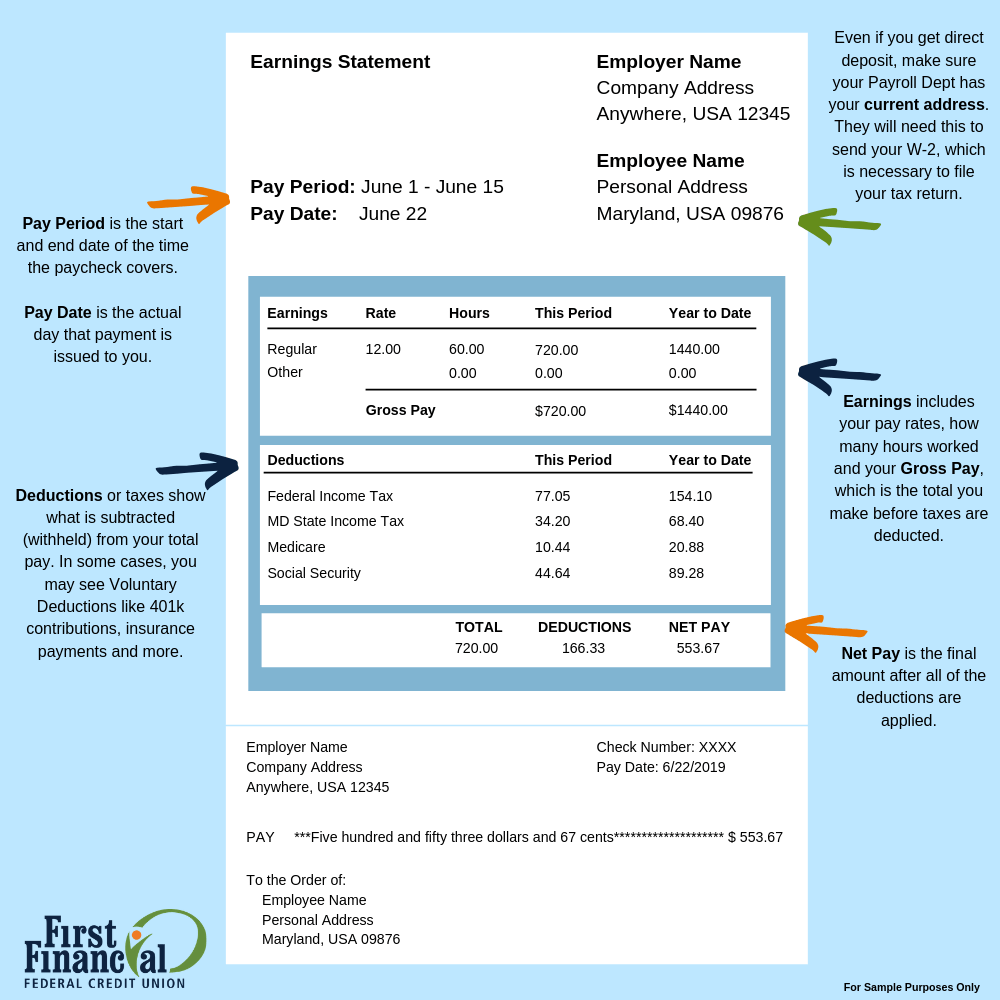
While there are differences in the details provided on a pay stub depending on the employer, there are some key pieces of information that are standard across every pay stub document. These include:
- Employee information
This refers to the employee’s name, address and sometimes employee ID or social security number. - Employer information
This includes the business name, address and federal employer identification number (FEIN). - Pay period
This refers to the specific period that that paycheck covers - Earnings
These are the gross wages earned during the pay period before any deductions have been made. - Deductions
Now, this refers to the various deductions, such as taxes (federal, state and local), Social Security, Medicare, health insurance, retirement contributions as well as any other voluntary deductions. This is both voluntary and involuntary deductions. - Net pay
Net pay refers to the amount of pay the employee receives after deductions. - Year-to-date (YTD) totals
Year-to-date, otherwise known as YTD are the accumulated totals of earnings and deductions from the beginning of the calendar year to the current pay period. - Hourly rate/salary
This is the employee’s hourly rate or annual salary - Hours worked
This applies to hourly employees and refers to the number of hours worked during the pay period. - Employment status
This refers to whether the employee is full-time, part-time or temporary. - Benefits
Details of any benefits provided by the employer, such as health insurance or retirement plans. - Taxes
Breakdown of taxes withheld, including federal income tax, state income tax, and local taxes if applicable.
How can you tell when a pay stub is fake?
There are some key red flags to look out for when trying to determine whether ot not a pay stub is fake.
- Formatting errors
Fake pay stubs often have inconsistent or sloppy formatting. This includes irregular font sizes, misaligned text or incorrect spacing. - Lack of company information
Legitimate pay stubs will always include the employer’s name, address and contact information, whereas a fake pay stubs may omit or have inaccurate company details, so always do your research. - Missing or inconsistent details
There are some key details that every pay stub should have, which we have gone into more detail about above. Check for missing or inconsistent information such as pay period dates, hourly rates or deductions. - Unrealistic earnings
Be wary of pay stubs showing unusually high earnings, especially if they are not consistent with the employee’s position or industry standards. If you want to understand market average pay in a particular industry and/or region, you can use resources such as, Glassdoor. - Incorrect calculations
Fake pay stubs may contain errors in calculating taxes, deductions or net pay. - Generic templates
Chances are, scammers have gone online and downloaded a generic pay stub template. So look for signs of a template being used, such as identical formatting across multiple pay stubs. - No record of employment
A real pay stub is typically accompanied by a record of employment or other employment verification documents. If these aren’t provided, then that can also be a red flag.
Frequently Asked Questions About Pay Stub Generator
Pay stubs are documents given by an employer to an employee alongside their paychecks during a particular period. They show how much the employee earned and what deductions were made during that period.
There are some key pieces of information that a real pay stub will include. From employer name to employee position and net pay, read out breakdown of the key pieces of information to look out for when determining whether a pay stub is real or not.
RemotePeople offers straightforward and intuitive generators for creating mandatory pay stubs, invoices, 1099s, and W-2s in just several easy steps.
Whether you run a small yet mighty startup, a medium-sized enterprise, or a large corporation – our platform offers a quick and easy solution for generating pay stubs. With user-friendly and intuitive yet comprehensive features to make your life as easy as possible, you can create professional pay stubs that comply with industry and regulatory standards for your employees within minutes.
Hire Anywhere.
We Handle the Rest.
- 150+ countries, fully compliant
- EOR from $199/, no hidden fees
- In-house recruiters included
- Real humans, not chatbots
- Rated 5/5 by 3,000+ companies
Switching from another EOR?
Get one year free.